Controlling the execution sequence of tasks.
I’ll begin by dragging these tasks unto the designer: Execute SQL, Data Flow, and Send Mail.
Then, connect the Execute SQL task’s green arrow to the Data Flow task.

Right-click the new constraint and verify these values.
Drag new constraints between the Execute SQL task, Send Mail task, and the Data Flow task.

Then, change the constraint between the Send Mail task and the Data Flow task so that if the Execute SQL task fails, an email is sent.
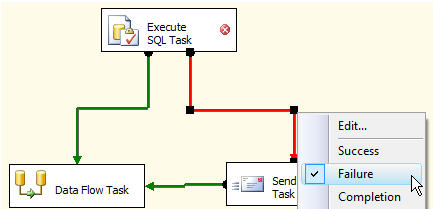
Based on both failure constraints, email will only be sent if either the Execute SQL or Data Flow tasks fail.
Since we want the email sent if either task fails, double-click one of the constraints and change the “Multiple Constraint” setting to “Logical OR…”
Now, the constraints’ dotted red line indicate if either task fails (not both), an email is sent.

 TechMbaBi